
AI images, video and sound
Image, video, and sound cards generate from a prompt and the cards connected to them, with your own provider keys. What they make is an ordinary file in your folder.
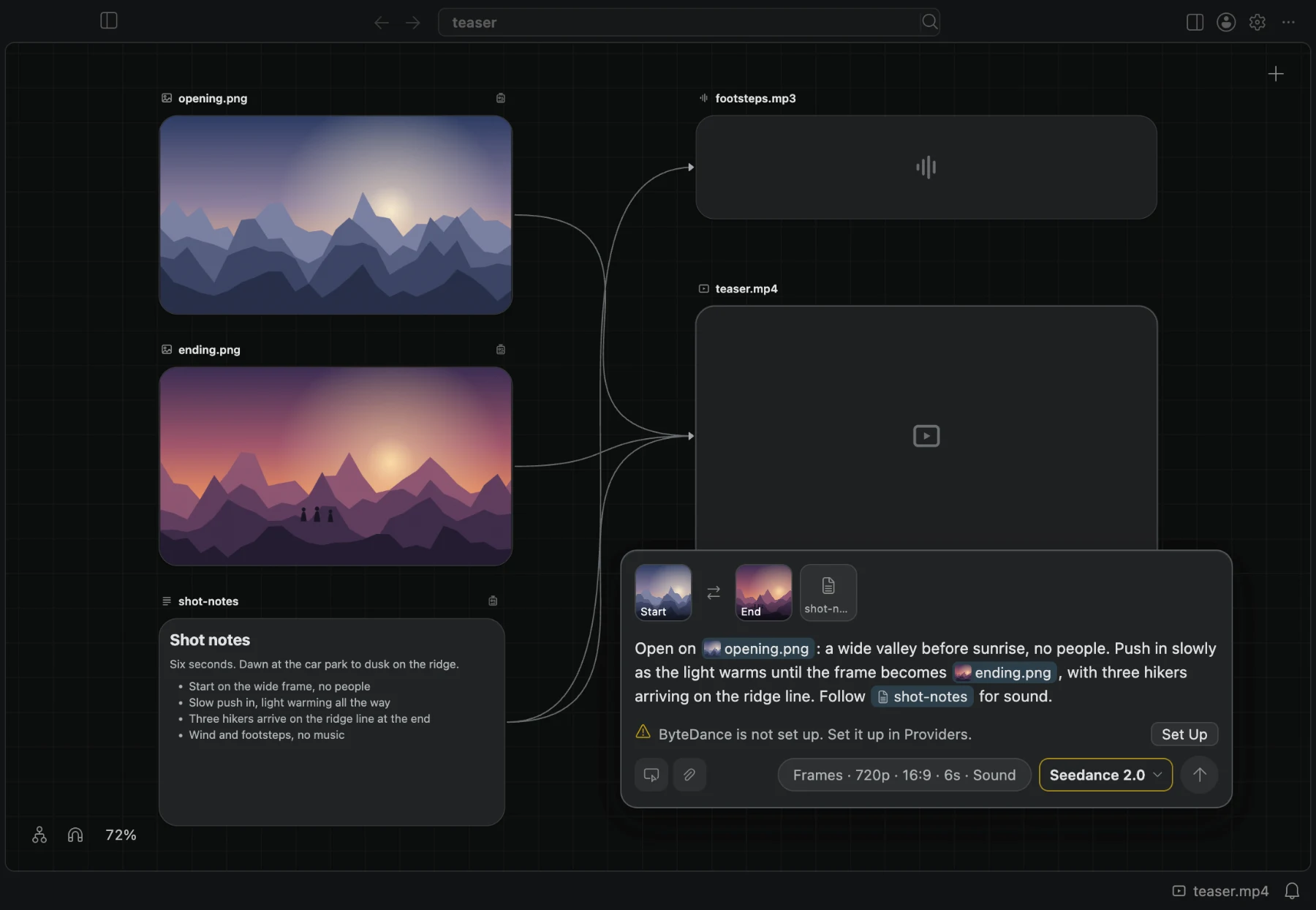
BaseHalf generates images, video, and sound from what is on your canvas. A card whose file does not exist yet is a draft: it holds a prompt and its settings, and the cards connected into it are its inputs. When it generates, its file lands in the folder under the card's name.
Create a draft
- Double-click an empty part of the canvas and choose New Image, New Video, or New Audio.
- Or drag a connection from a card onto an empty part of the canvas and choose Image, Video, or Audio. That card becomes the draft's first input.
A new draft is named image, video, or audio with the extension its model delivers, such as image.png, video.mp4, or audio.mp3, with a number when the name is taken. It starts with the provider, model, and settings of your last generation of its kind on this Mac. It is selected, and its panel opens under the card with the prompt ready for typing. A draft is not in your file list until its file exists.
Inputs are connections
A draft's inputs are its upstream connections, in order, and every one is sent.
- Images, videos, and audio are used as the model's mode needs them: a start frame and an end frame, references, or a clip to extend or edit.
- Notes and text files join the prompt, after your own text, each under its name. For a speech model, a connected note is what the voice says.
- The input row above the prompt shows a draft's connections as tiles, in their order. Drag a tile to change the order. Two buttons on the panel add an input. Pick on Canvas stays on while you click cards to connect or remove them, until Done or Escape. Import File… copies a file into the card's folder and connects it.
- A connection the model cannot use is refused when you make it, with the reason, such as a video into a model that takes no video, or one image more than it takes.
- The mode follows the inputs. When the draft's mode cannot use everything connected, the panel shows the mode that can, and that is the one sent.
Mentions
Type @ in the prompt to mention a file. The menu lists the draft's inputs and the cards on this canvas, by kind; choosing a card that is not connected yet connects it too. A mention shows as a chip with the file's name and picture, and it keeps naming that file when you reorder the inputs or rename the file. When you remove a connection, its mentions leave the prompt.
When the prompt is sent, each mention is written the way the chosen model names its inputs, so the same prompt works with every model.
Providers and keys
BaseHalf sends each request straight to the provider, with your own key. There is no BaseHalf service in between, and BaseHalf shows no prices: what a generation costs is in your provider's console, where you got the key.
Set up providers in Settings, under BaseHalf, on the Providers page. For each provider you enter your credentials and, when it has more than one region, choose one. If you use a relay or a private gateway that mirrors the provider's own API, you can enter its address as well. Credentials are stored encrypted on this Mac, never in your folder. Nothing is checked when you save them: the first generation tells you whether they work.
- Video: ByteDance, Kling, Alibaba, MiniMax, Vidu, Google, PixVerse, Luma, Runway, xAI, LTX, and Black Forest Labs.
- Images: ByteDance, Kling, Alibaba, MiniMax, Vidu, Google, Luma, Runway, xAI, Black Forest Labs, and OpenAI.
- Sound: ElevenLabs, Fish Audio, Mureka, MiniMax, and Google.
Settings
Each model shows exactly the settings it accepts, such as its mode, ratio, duration, or sound, and nothing else. More opens advanced settings such as the seed and the negative prompt. When you switch to another model, every value the new model accepts is kept and the rest go back to their defaults.
The inputs can narrow a setting: a duration ends where the model's limit for the connected videos ends, with the reason under it. When the card cannot generate, Generate is dimmed and its tooltip says why. A reason outside the panel, such as a provider that is not set up, shows as a line with a way to set it up.
An image model can make several images at once. Each lands on a card of its own, in a row beside the first.
Sound
An audio model makes speech, music, or sound effects, and the panel follows the model. A speech model says your prompt or a connected note, in a voice you choose with the panel's voice button: one of the provider's voices, or one of your account. A music model makes a song from a description, or in Lyrics mode sings your lyrics. A generation that makes several songs gives each its own card.
While it runs
Press Generate, or Cmd+Enter. Progress shows on the card, and the generation keeps going when you close the panel or switch to another canvas. Once the provider has the task, it also survives a reload or a restart. A model that answers with its files at once, as many image models do, has no task to come back to: if BaseHalf closes first, the card says the files may have been made and charged, and asks you to check the provider's console.
- The stop button ends it and asks the provider to cancel where it can.
- When a generation fails, the card shows the provider's message and is a draft again: change what you need and generate again on the same card.
- When BaseHalf cannot tell whether a request reached the provider, it says so and asks you to check the provider's console first. It never sends a request again by itself, because a second request may be charged again.
Results are files
The finished image, video, or sound lands in the folder at the draft's path, as an ordinary file that your file list, Finder, git, and your agents all see, and the card shows it. What made a generated file never changes, also after you trim it. Its panel shows what made it: the inputs, the prompt, the model, and the settings.
To try again, choose New Version. It makes a new draft beside the card with the same prompt, inputs, and settings, apart from the seed, and nothing is generated until you press Generate. Earlier results are never overwritten. To build on the result itself, connect from its card to a new draft.
Agents can generate too
An agent can make a draft by writing its prompt, model, and settings in .bh/mirror/<path>/generation.yaml and its inputs in upstream.yaml, and generate it with basehalf --generate <path> from an Agent Area terminal. The command does not ask for confirmation, since the request and the key are yours. On a generated file, it makes a new version first. It prints the cards that will generate and does not wait for the files. Codex's default sandbox refuses the command.
basehalf --list-capabilities lists the providers, models, and settings an agent can choose from, and the BaseHalf skill describes the files.
Next
- Connections: how inputs are connected and ordered.
- Working with agents: run agents beside the canvas.