
Connections
An upstream connection says that one item's context flows into another. Connections are saved as plain text in your folder, so agents and other tools see them too.
What a connection means
A connection A → B means that A's context flows into B. When you or an agent work on B, A is part of what B builds on. A is upstream of B, and B is downstream of A.
Connections form a graph, not a tree. A note can draw on many items, one item can feed many notes, and cycles are allowed. An item cannot be its own upstream.
Markdown links are something else. A link in a note is for navigation and never creates a connection.
Making connections on the canvas
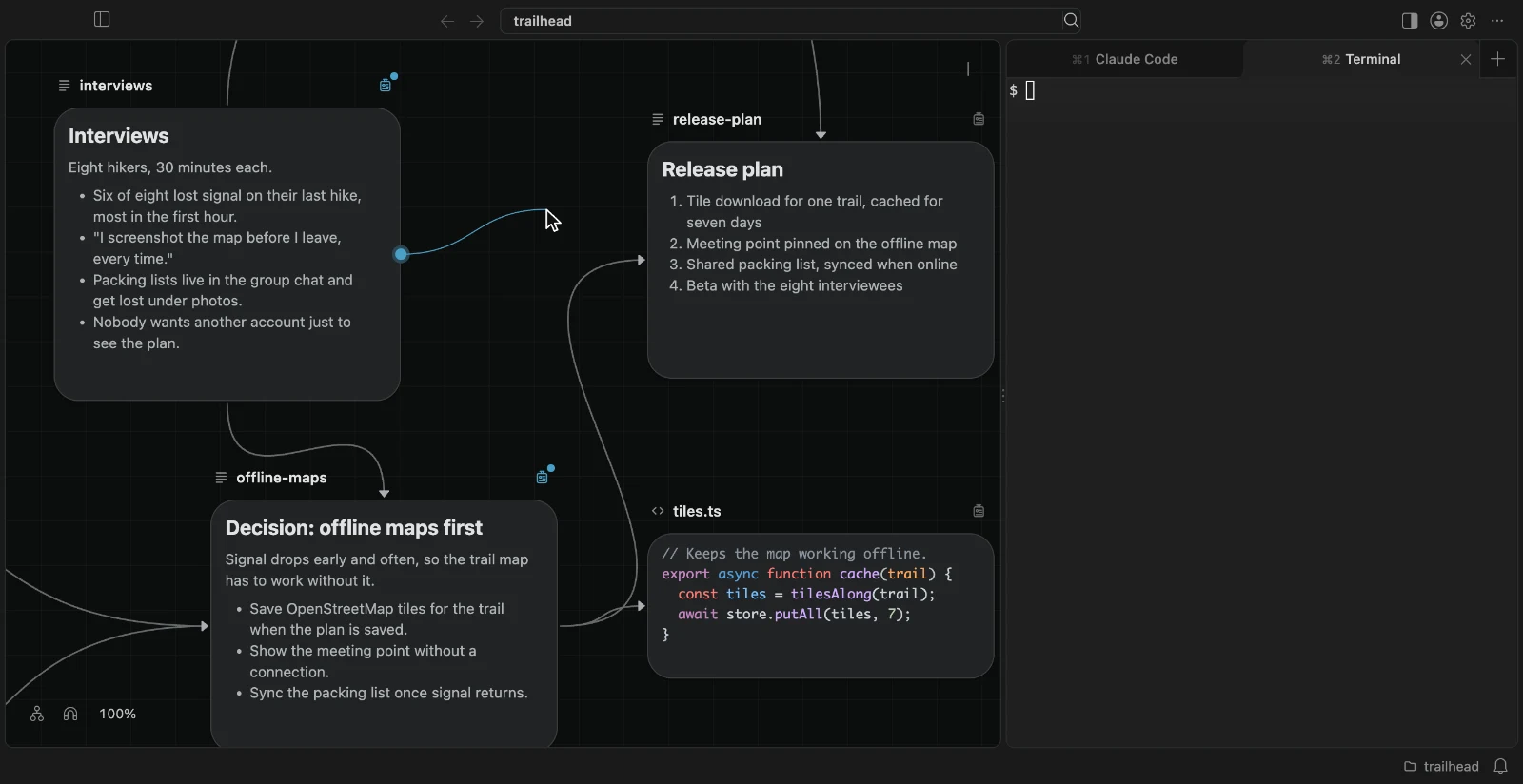
Every card has four connection handles, one in the middle of each side. They appear when you point at the card.
- Drag from a handle onto another card. The card you start from becomes upstream of the card you drop on, and a line is drawn between them.
- Drop on an empty part of the canvas to create something new that builds on the card you started from: a note, or an image, video, or sound draft to generate from it. The new item lists your card as its upstream from the moment it exists. A new note opens for typing.
- Click a line to select it, and press Delete to remove it. Drag an end of a line: let go on another card to reconnect it, or on empty canvas to remove it. Let go anywhere else and it goes back.
- Drag a box that touches no card to select every line it crosses. Delete removes them all as one step of undo.
Every one of these can be undone.
Lines are drawn between cards in the same folder. A connection to an item in another folder has no line, but it is listed in the card's badge and counted there.
A generated file keeps the inputs that made it, and a draft keeps its inputs while it generates. Changing them is refused, with the reason.
The badge
Every card but a draft has a badge, which turns the card over to show:
- a one-line description of the item;
- its Upstream list, the items whose context flows into it. Add Upstream lets you pick any item in the workspace, and × removes one;
- its Downstream list, the items that draw on it. Add Downstream adds this card to another item's upstream list.
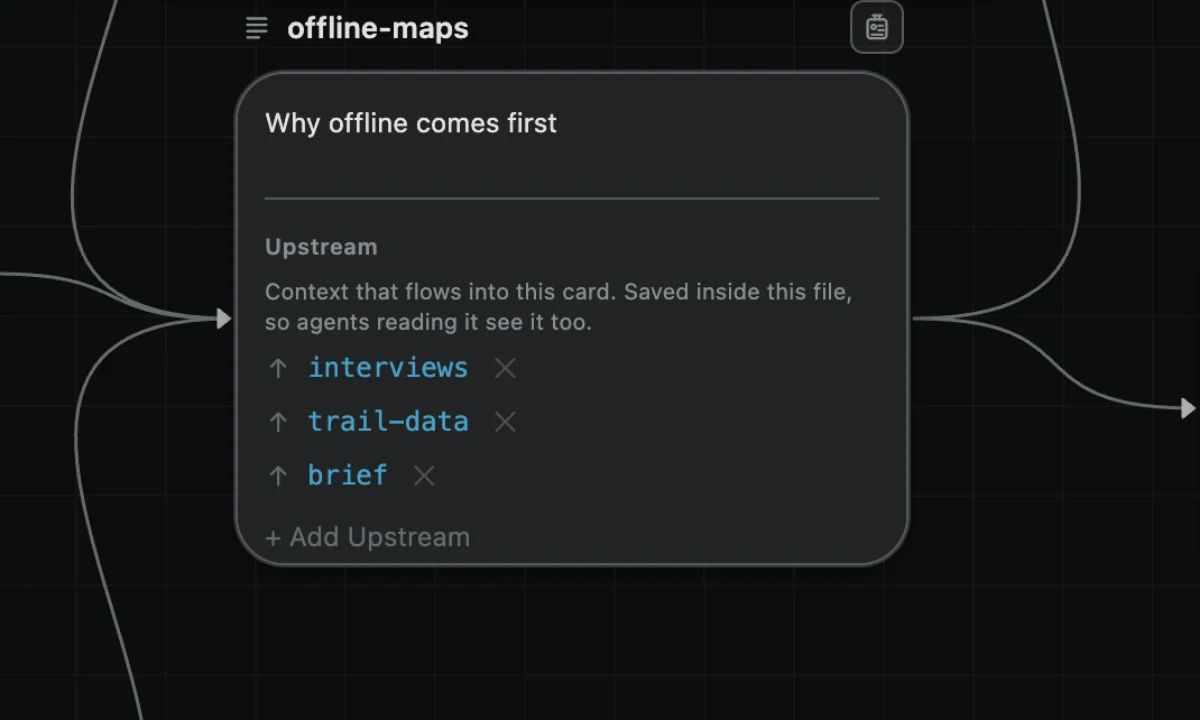
Pointing at the card's badge toggle shows the counts, for example "↑2 upstream · ↓1 downstream".
Where a connection is saved
A connection is saved once, inside the downstream item, the way a source file declares its own imports.
A Markdown note keeps its list in its frontmatter, the block at the top of the file, under upstream:
---
upstream:
  - research/interviews.md
  - sources/survey-results.pdf
---

# Launch decision
Entries are paths relative to the workspace folder. A note that cannot hold a list, such as one that starts with a horizontal rule, has its list kept by BaseHalf, as below.
A folder, a PDF, an image, a video, or any other file that cannot hold a list itself has its list kept by BaseHalf, in .bh/mirror/<path>/upstream.yaml, where <path> is the item's path in the workspace. A draft keeps its inputs there too, before its file exists.
The other direction, what an item feeds, is never saved anywhere. BaseHalf works it out from all the upstream lists.
Because the list sits inside the note, an agent that opens the note sees what it builds on without any setup. The first time BaseHalf adds a frontmatter block to a note that had none, it tells you once.
Editing lists as text
An upstream list is plain text. You, an agent, or any other tool can edit it, and BaseHalf uses whatever is saved in the file.
BaseHalf itself changes a list in two cases. One is when you change it: connecting, disconnecting, or reconnecting on the canvas, changing an entry in the badge or a draft's panel, creating a connected item, or fixing a broken entry. The other is when an item moves, by anyone: it then rewrites the entries that name the item, without asking. BaseHalf runs no background program.
Broken entries
An entry that names an item that no longer exists stays in the list as a broken entry. The badge shows it in place, in a warning style, with ways to fix it:
- Relink points the entry at another item. When exactly one item in the workspace has the same file name, BaseHalf offers to relink to it directly.
- Relink Everywhere fixes the same missing path in every list that names it, as one step of undo.
- Remove deletes the entry.
BaseHalf: Show Upstream Issues in the Command Palette lists every problem in the workspace, grouped by file, with the same actions.
Deleting an item never changes another item's list. The entries that named it become broken until you fix them, or until you undo the delete.
Moving and renaming
An item keeps its card whoever moves or renames it: you, an agent, Finder, or git, also while BaseHalf is closed. BaseHalf recognizes the item at its new path by its content, moves what it keeps for the item, and updates every entry that names it, without asking.
A renamed card keeps its place, and a card moved to another folder goes after the last card there. A file that was also rewritten by more than half, an empty file, and a folder with no files are not recognized, and entries that named them show as broken. A draft has no file, so it moves only in BaseHalf.
Next
- Working with agents: how agents read connections and what you selected.
- AI images, video and sound: connections as the inputs of a generation.
Canvas and cards
Folders open as canvases and files as cards. Create, read, edit, rename, select, arrange, and delete them; card places are saved beside your work and kept out of git.
Working with agents
Run Claude Code, Codex, and other agents beside your canvas, give them the BaseHalf skill, and let them see what you selected.