
Get started
Download BaseHalf for macOS on Apple Silicon, open it the first time, and open your first folder as a canvas.
What you need
BaseHalf runs on macOS on a Mac with Apple Silicon.
Agents are optional. The canvas works on its own. To run agents in the Agent Area, install the ones you want to use, such as the Claude Code or Codex command-line tools.
Download
- Open the latest release on GitHub.
- Download the disk image for Apple Silicon. Its file name ends in
darwin-arm64.dmg. - Open the disk image and drag BaseHalf into your Applications folder.
First launch
The macOS build is not signed or notarized, so macOS may refuse to open it the first time. After moving the app to Applications, run this once in Terminal:
xattr -dr com.apple.quarantine /Applications/BaseHalf.appThe command removes the quarantine flag that macOS puts on downloaded apps. After that, start BaseHalf the way you start any other app.
Run this command only for a copy of BaseHalf you downloaded from the official release on GitHub.
Open a folder
BaseHalf works on folders you already have: a code project, a research folder, a course, a pile of notes. Open one, and it appears as a canvas.
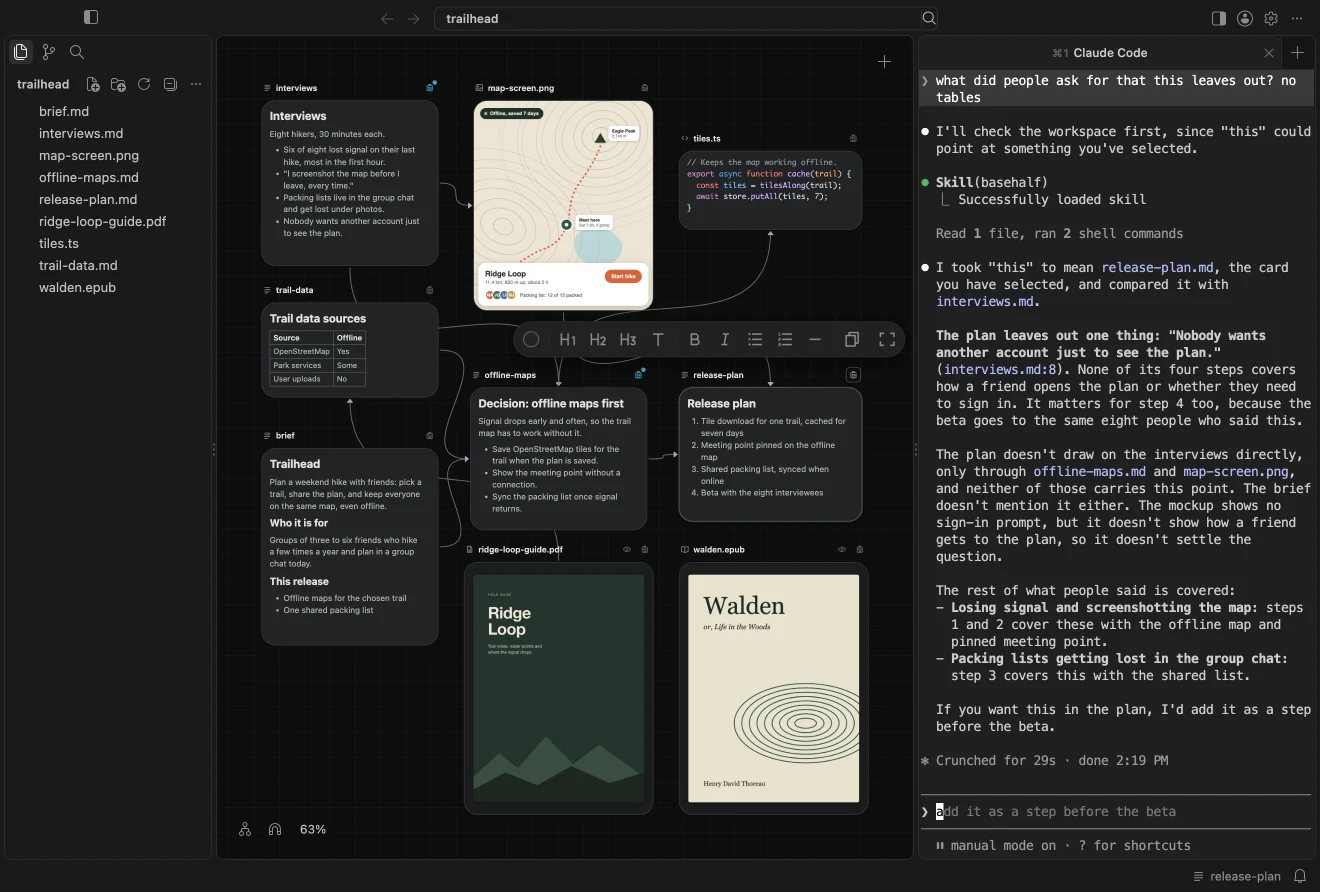
What you see:
- The canvas in the middle. The files and subfolders of the folder are cards.
- The sidebar on the left, with your files, Source Control, and Search.
- The Agent Area on the right, where agent sessions run.
- The title bar, with the buttons that show and hide the sidebar and the Agent Area, and the path of what you see. A click on the path opens the search.
Opening a folder changes none of your files. The first time BaseHalf shows a folder's canvas, it creates a hidden .bh/ folder to remember where the cards are. That folder comes with its own ignore file, so card places stay out of git. BaseHalf never edits your own .gitignore.
Try a first connection
- Double-click an empty part of the canvas and choose New Note. The note appears where you double-clicked, ready for typing.
- Write a line or two. Press Escape or click elsewhere to finish.
- Move the pointer over another card. A small handle appears in the middle of each side. Drag from one of them onto your new note.
The line you drew is a connection: the other card now flows into your note. BaseHalf saved it inside the note, in an upstream list at the top of the file, where any agent that opens the note can read it. Connections explains the details.
Agents
When you open a folder, BaseHalf offers to install its skill for your agents, and the offer stays until you answer it. Install it if you plan to use Claude Code, Codex, or another agent that loads skills. It is added to the agents' own settings on your Mac, not to your folder, and BaseHalf keeps it up to date. See Working with agents.
Updates
BaseHalf updates itself. When a new release is out, it downloads the update once, in the background, and installs it when you quit, or at the latest the next time you start BaseHalf.
You can see the version you are running, and its updates, in Settings, under BaseHalf, on the About page. Release Notes there opens the release page.
Next
- Canvas and cards: everything you can do with cards.
- Connections: what upstream means and where it is kept.
- Working with agents: the Agent Area, the skill, and selection.
Overview
BaseHalf opens a normal folder as a canvas, keeps the connections between your files as plain text in that folder, and lets your agents read the same structure you see.
Canvas and cards
Folders open as canvases and files as cards. Create, read, edit, rename, select, arrange, and delete them; card places are saved beside your work and kept out of git.